Feed-Videos, IGTV und Clips von Instagram in Full HD herunterladen. Schnell, kostenlos und ohne Registrierung.
Video-Downloader öffnenINSTAGRAM STORY DOWNLOADER
Instagram story downloader
Paste a public Instagram Story share link while it is still active. SMDownloader resolves the media on our servers — preview the clip or image, then save before the 24-hour window closes. No Instagram login.
Weitere Instagram-Tools
Einen anderen Beitragstyp speichern? Jedes Format hat seine eigene Seite mit passenden Schritten und FAQs – gleiches Einfügefeld, andere Hilfe unten.
Instagram Reel-URL einfügen → MP4-Video mit Originalton in Full HD herunterladen. Ohne Anmeldung, werbefrei am Edge.
Reels-Downloader öffnenExtrahieren Sie Musik und Sounds aus Instagram Reels und Videos als hochwertige Audiodatei.
Audio-Downloader öffnenInstagram Story Downloader — Anonymous HDAktuelles Tool
StoryStories disappear after 24 hours. Copy Share → Copy link while a public story is still live, paste it here, and save the video or image to your device.
Jetzt öffnenPaste a public instagram.com/p/… link for a single-photo feed post. SMDownloader resolves the image on our servers at the resolution Instagram exposes to logged-out viewers.
Foto-Downloader öffnenPaste a public instagram.com/p/… carousel link. SMDownloader resolves every slide on our servers — one /p/ URL lists each image or video in the preview before you save.
Karussell-Downloader öffnenInstagram Profile Picture Downloader
ProfilbildDownload Instagram profile pictures in full resolution HD (1080p). View and save any public IG avatar anonymously directly to your device.
Video-Downloader öffnen
Downloader für andere Plattformen
Aus einer anderen App speichern? Jedes Tool von SMDownloader funktioniert gleich – öffentlichen Link einfügen, Vorschau ansehen, speichern:
Download Instagram Stories before they vanish
Instagram Stories are ephemeral posts published under instagram.com/stories/username/STORY_ID/ that automatically vanish after 24 hours unless saved as a permanent Highlight. SMDownloader queries public Meta story endpoints anonymously — no Instagram login and no view receipt — to locate active Full HD media before the expiration timer elapses. To save an Instagram story to your phone gallery, download it while it is live and then save the file from the preview — on iPhone it lands in Photos, on Android check Downloads and move it to your gallery.
How to download an Instagram Story
- 01
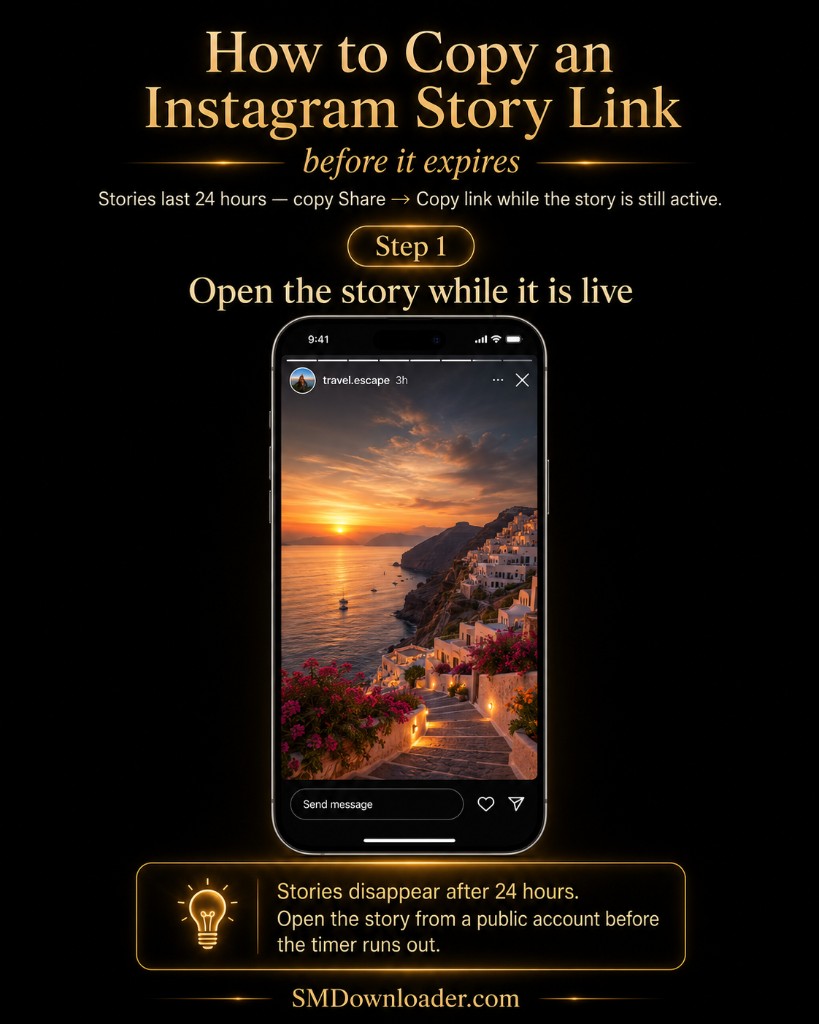
Open the active story
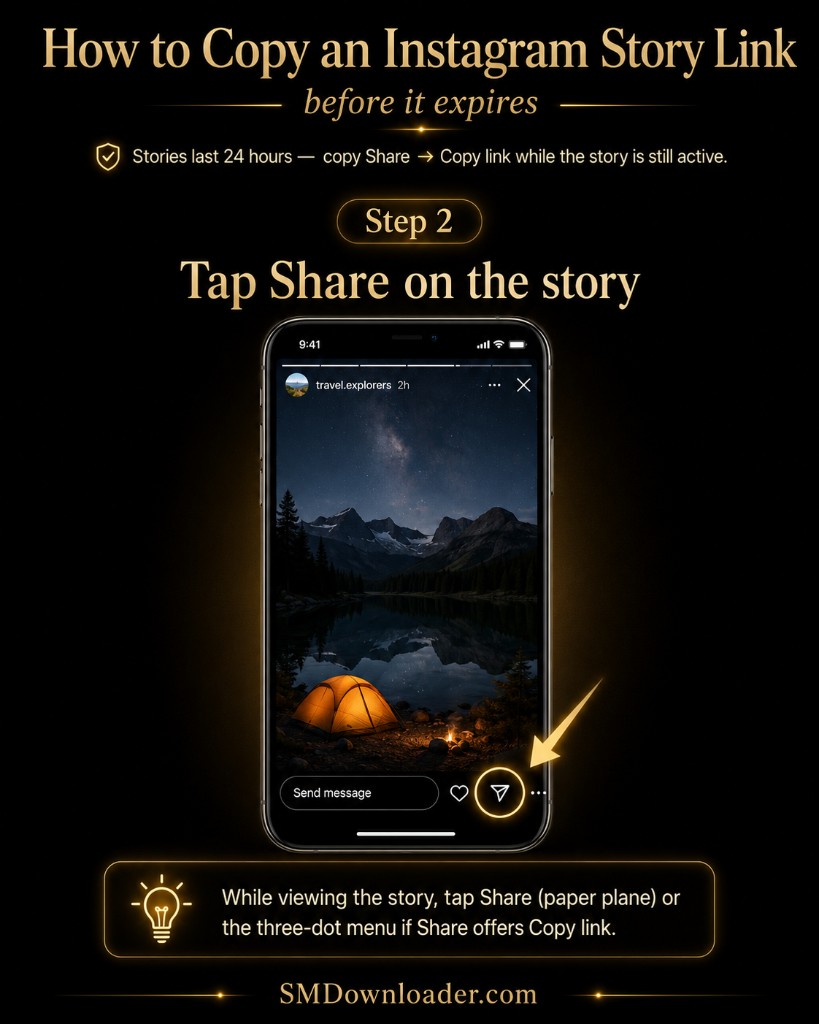
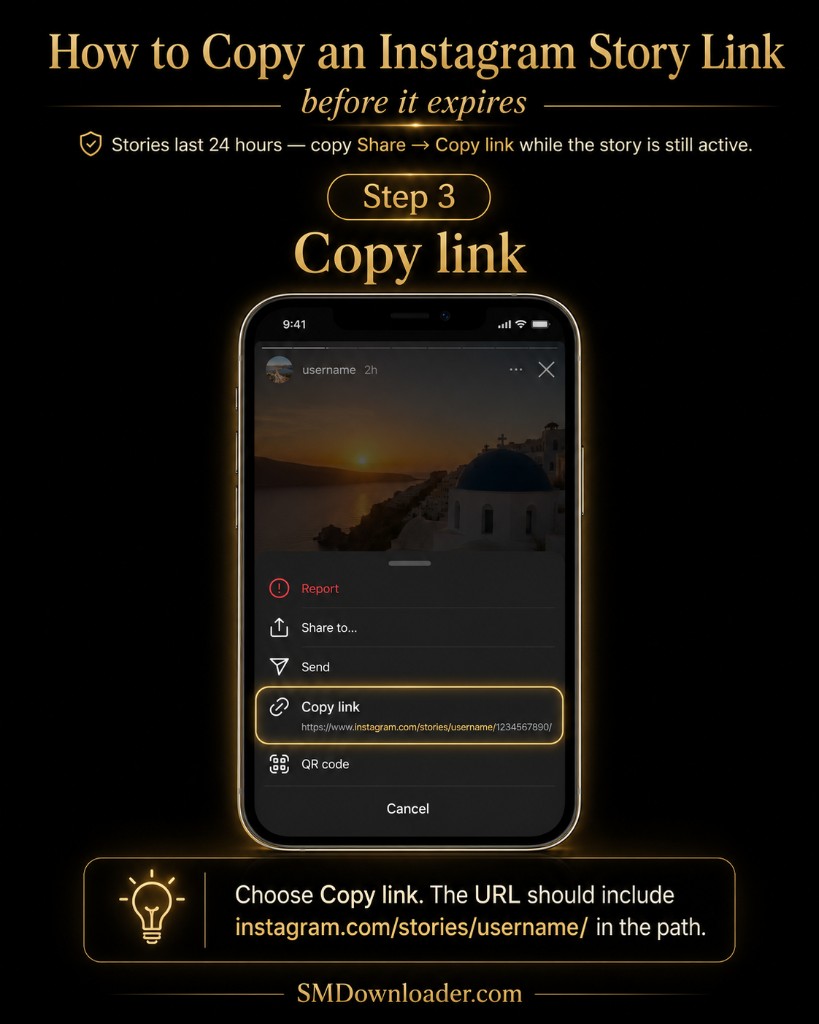
View the public story in Instagram, tap the three dots or Share icon, and select Copy link before 24 hours pass.
- 02
Paste URL into SMDownloader
Enter the story link into the field above and tap Download to check live story availability on our servers.
- 03
Save before expiration
Preview the story media in the player or image viewer, then immediately save the file to your device.


Warum SMDownloader nutzen
- Active 24-hour ephemeral story capture. Retrieves time-sensitive story posts directly from Meta servers while the 24-hour publication window is live.
- Video clips and photo stills. Detects whether the target story contains a 1080p vertical video clip or a full-resolution portrait image.
- Public Highlights URL support. Extracts archived story slides saved in public profile Highlights where permalink access is available.
Hilfe
Hilfe beim Kopieren des Links?
Schritt-für-Schritt-Anleitungen zum Kopieren der genauen Beitrags-URL auf dem Smartphone oder im Browser – danach einfach in das obige Feld einfügen.
- Link auf dem Smartphone finden
- Link im Browser finden
- Copy a reel URL
- Copy a video post URL
- Copy a photo post URL
- Copy a story link
Unterstützte Link-Formate
https://www.instagram.com/stories/username/STORY_ID/
Close Friends stories and private-account stories require login — those links will not work here. Public stories only.
Highlights use different URL patterns and may behave like archived posts. For expired stories, no tool can recover the media retroactively.
Wo Dateien gespeichert werden
Nach der Vorschau speicherst du die Datei mit dem Browser. Auf dem iPhone nutze Teilen → In Fotos sichern; auf Android den Ordner Downloads. SMDownloader speichert keine dauerhaften Kopien und versendet keine Dateien per E-Mail.
Grenzen
Welche Links nicht funktionieren
- Keine privaten Konten oder passwortgeschützte Inhalte
- Keine Umgehung von Bezahlschranken oder DRM-Verschlüsselungen
- Keine dauerhafte Speicherung oder Archivierung von Medien
Häufige Fragen
How do I download an active Instagram Story before it expires?
Open the active story, tap Share → Copy link, and paste the URL into SMDownloader. Because stories expire after 24 hours, you must initiate the download while the post remains publicly visible.
Can SMDownloader retrieve expired Instagram Stories after 24 hours?
No. Once the 24-hour window expires, Instagram deletes the media from CDN distribution nodes. No downloader tool can recover an expired story after it disappears.
Do Close Friends stories or private account stories work?
No. Stories shared to Close Friends or posted by private accounts require session cookies and account authorization. SMDownloader works exclusively with publicly accessible story links.
Can I download Instagram Highlights with this tool?
Yes. Highlights are saved stories organized into profile collections. If you copy the link to a public Highlight, our servers will attempt to parse and display the associated media slides.
Why does a story link return an error or blank preview?
This occurs if the story has expired, the creator deleted the post prematurely, the account was switched to private, or the copied URL was truncated.
Are story downloads visible to the account owner?
No. SMDownloader fetches public media through logged-out server requests. The account owner will not see your username on their story viewers list.
Is Instagram story download anonymous?
Yes. No Instagram login is required and no view receipt is sent to the poster. Requests run from our servers as logged-out public fetches, so your account never appears on the story viewers list when you preview or save a public story link.
How do I save an Instagram story to my phone gallery?
Download the story from this page while it is still live, then save the file from the preview. On iPhone, tap Save so the clip lands in Photos; on Android, check the Downloads folder and move it to your gallery. See the where-files-save guide for where downloads land on each device.
Can I copy a story link from desktop web browsers?
Yes. Navigate to instagram.com/stories/username/STORY_ID/ in Chrome, Safari, or Edge while logged in, copy the address bar URL, and paste it into SMDownloader.
What video or photo resolution do downloaded stories have?
Instagram Stories render in 9:16 vertical aspect ratio at resolutions up to 1080x1920 pixels for video clips and high-definition JPEG stills for photo slides.
SMDownloader ist nicht mit Instagram verbunden. Laden Sie nur öffentliche Inhalte herunter, zu deren Speicherung Sie berechtigt sind. Siehe Instagram Downloader-Übersicht für alle unterstützten URL-Formate.